[[META DESCRIPTION: Invoice automation helps SMEs in Pretoria send invoices faster, cut admin time, reduce errors, and get paid sooner with simple workflows and controls.]]
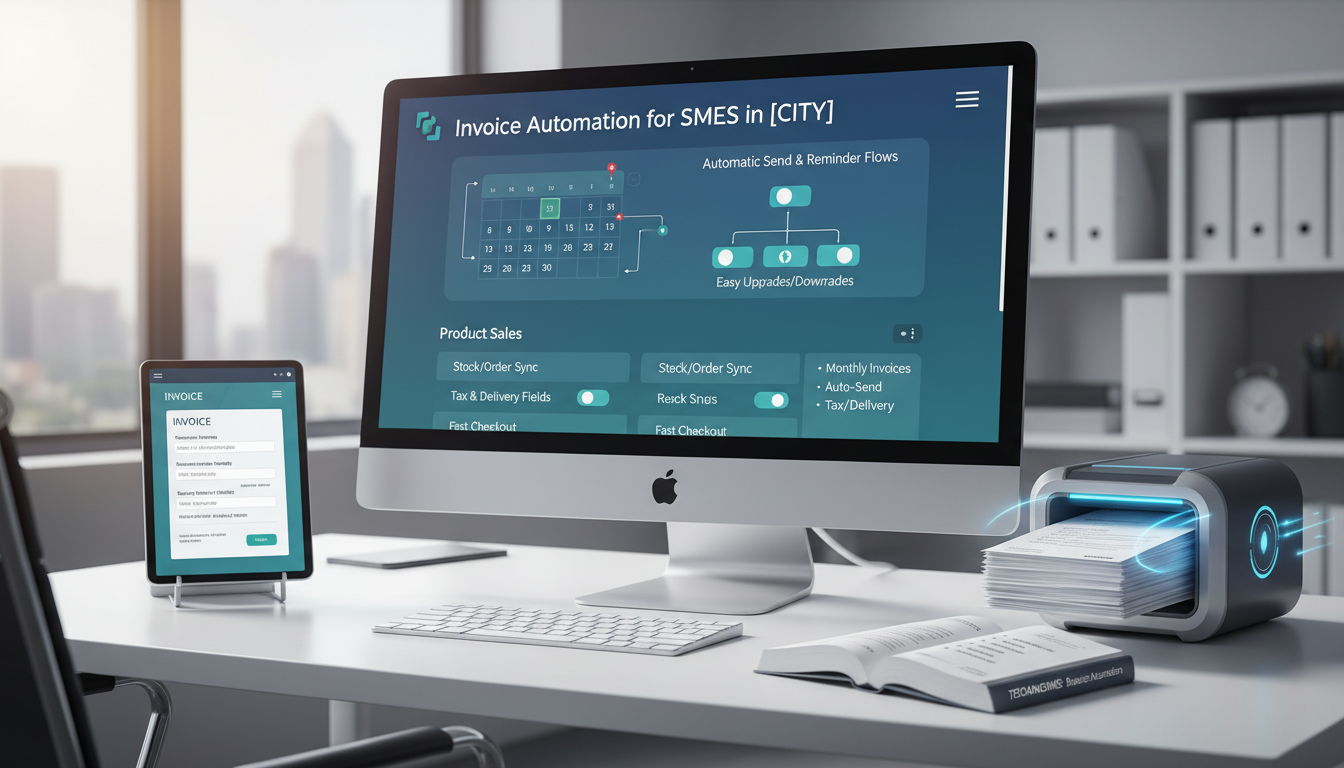
[[MEDIA: AI-GENERATED IMAGE | size: 1200×630 | style: Business automation (Techanisms), clean SaaS diagram look | placement: feature at top | alt: invoice automation workflow for SMEs showing CRM to invoice to payment to accounting sync]]
Invoice automation is a simple way to create, send, track, and record invoices with less manual work. It connects your sales data, invoice tool, payments, and accounting.
Direct answer (featured snippet): Invoice automation uses rules and connected tools to turn “work done” into “invoice sent,” then “payment matched,” then “books updated.” It creates invoices from your sales or job data, sends them with payment options, follows up with reminders, and syncs results to accounting. This cuts admin time, errors, and late payments.
A Pretoria business owner once said their week had two peaks. One was sales. The other was admin. Deals came in. Then late nights started. Invoices sat in drafts. Payments arrived with no reference. Month-end felt like a rescue mission.
Invoice automation flips that story. It turns invoicing into a calm, repeatable flow. It cuts chaos. It improves cash flow visibility. And it keeps data tidy for better decisions.
Direct answer: Invoice automation is a set of rules and tool links that move you from “work done” to “invoice sent” to “payment matched” to “books updated” with fewer clicks and fewer mistakes.
[[MEDIA: AI-GENERATED IMAGE | size: 1200×700 | style: Simple checklist infographic, clean SaaS look | placement: after intro | alt: invoice automation checklist for SMEs showing trigger, invoice draft, approval, send with payment link, reminders, accounting sync]]
Table of Contents
- What invoice automation actually is (and what it isn’t)
- Why SMEs in Pretoria are automating invoicing now
- The end-to-end invoice automation workflow (step-by-step)
- Integrations that make invoice automation work (CRM, accounting, payments)
- Choosing the right invoice automation setup for your business model
- Controls and compliance: keeping automated invoicing accurate and audit-friendly
- Implementation plan: how to roll out invoice automation in 30–60 days
- Common pitfalls (and how to avoid them)
- What success looks like: metrics to track and next automations to add
What invoice automation actually is (and what it isn’t)
Invoice automation is not just emailing a PDF. It is not only a nice template. It is a full workflow.
It helps a business move from: job done → invoice sent → payment collected → books updated.
From manual invoicing to automated workflows
Manual invoicing often looks like this:
- Someone copies details from a quote
- Someone checks VAT and totals
- Someone emails an invoice
- Someone follows up when it is late
- Someone matches payments to invoices
- Someone fixes errors at month-end
Invoice automation replaces repeat steps with rules. People still stay in control. But the system does more of the work.
The goal is simple: less admin, fewer mistakes, faster cash in.
The core components: triggers, templates, approvals, payment links, sync
Most good invoice automation setups include:
- Triggers: a rule that starts invoicing (example: deal marked Won)
- Templates: invoice layouts with the right fields and VAT notes
- Approvals: checks before sending (example: margin or discount review)
- Payment links: pay-now options inside the invoice
- Sync: updates across CRM, accounting, and payment tools
When these parts work together, invoice automation becomes predictable.
Common myths that hold SMEs back
Many SMEs delay invoice automation due to myths like:
- Myth: automation is only for big firms
Truth: SMEs often gain the most, because time is tight. - Myth: it removes control
Truth: good setups add checks, approvals, and audit trails. - Myth: it is too complex
Truth: the best flows are simple and use fewer steps. - Myth: it will break VAT or compliance
Truth: the right rules make VAT handling more consistent.
Why SMEs in Pretoria are automating invoicing now
SMEs in Pretoria face the same pressure each month: do more with less. Cash must move. Admin must shrink. Data must be trusted.
Cutting admin time without adding headcount
Invoice automation reduces repeat work like:
- Copying client details
- Rebuilding line items
- Checking totals
- Sending reminder emails
- Updating invoice status by hand
This frees people up for higher value work.
Result: a smaller admin load without hiring.
Getting paid faster and improving cash flow visibility
Late invoicing leads to late payment. It is that simple.
Invoice automation helps by:
- Sending invoices as soon as work is approved
- Adding clear payment terms and due dates
- Including pay-now links
- Sending polite reminders on schedule
It also helps teams see what is happening right now:
- What is sent
- What is overdue
- What is paid
- What is stuck in approval
This supports better choices on spending and growth.
Reducing errors, disputes, and messy data
Disputes often start with small mistakes:
- Wrong client details
- Wrong VAT treatment
- Missing purchase order numbers
- Different wording across invoices
Invoice automation helps you keep inputs the same each time. It also logs what changed and when.
Cleaner data means:
- Fewer back-and-forth emails
- Faster month-end close
- Better reporting and dashboards
The end-to-end invoice automation workflow (step-by-step)
This is a practical flow most SMEs can use. It can start in a CRM, a job system, or a sales pipeline.
[[MEDIA: AI-GENERATED IMAGE | size: 1200×700 | style: Clean flowchart diagram, simple SaaS look | placement: before Step 1 | alt: step-by-step invoice automation workflow from quote approval to invoice send to reminders to payment matching to accounting sync]]
Step 1: Quote/Order to invoice creation
The first win is to stop retyping.
A strong setup does this:
- Quote or order is approved
- The system creates a draft invoice
- Client details pull in from the CRM
- Line items pull in from the quote
- VAT rules apply based on the product and client
Key rule: one source of truth. Client records should live in one main place.
Helpful fields to capture early:
- Legal entity name
- VAT number (if relevant)
- Billing email
- Billing address
- Purchase order requirement
- Payment terms
Step 2: Approval and control checks
Not every invoice needs approval. But some should.
Common approval triggers:
- Discount above a set rule
- Invoice value above a set rule
- New client (first invoice)
- Manual line item edits
Controls to add:
- Required fields must be filled
- VAT calculation must match rules
- Invoice number must be unique
Best practice: keep approvals fast. If it takes days, cash slows down.
Step 3: Sending invoices with the right payment options
Once approved, invoices should send from a shared system.
Good sending includes:
- A clear subject line
- A due date in plain words
- A short payment instruction
- A pay-now link where possible
Payment options in South Africa often include:
- Card payments via a payment gateway
- Bank transfer (EFT)
- Direct Debit where suitable
Make it easy to pay. More steps can mean slower payment.
Step 4: Automated reminders and status updates
Follow-up should not rely on memory.
A simple reminder plan:
- Reminder before due date
- Reminder on due date
- Reminder after due date
- Escalation if still unpaid
Status updates to automate:
- Sent
- Viewed (if supported)
- Paid
- Overdue
- In dispute
Internal alerts can help too:
- Notify account manager when an invoice goes overdue
- Notify finance when a payment arrives with no reference
Step 5: Reconciliation-ready accounting entries
This is where many SMEs feel the pain.
A good workflow makes accounting easier by:
- Posting invoices to the right accounts
- Recording VAT correctly
- Linking payments to the right invoices
- Creating receipts automatically when payment is confirmed
Goal: when the bank feed shows a payment, matching should be fast.
Outputs to aim for:
- Clean debtor ledger
- Accurate VAT reporting
- Consistent chart of accounts coding
- Fewer suspense items
Integrations that make invoice automation work (CRM, accounting, payments)
Invoice automation works best when systems talk to each other. Keep the integration map simple.
CRM triggers: when an invoice should be created
A CRM can start the workflow when:
- A deal is marked Won
- A job is marked Complete
- A project milestone is approved
- A subscription renews
Rules to define:
- Who can trigger invoice creation
- What fields must exist before an invoice can be created
- What happens if a deal is changed after invoicing
Tip: lock key fields after send. This helps stop silent changes.
Accounting sync: chart of accounts, VAT, and tracking categories
Accounting sync should handle:
- Customer records
- Invoice numbers
- VAT treatment and notes
- Revenue accounts
- Tracking categories (like branch, team, service line)
For South Africa, VAT handling should be consistent and easy to check.
Data rules to agree on:
- One chart of accounts structure
- One naming standard for customers
- One way to handle credit notes and adjustments
Payment integrations: cards, bank transfer, Direct Debit, and receipts
Payments should update invoice status with minimal manual steps.
A strong payment setup can:
- Add a pay-now link to invoices
- Confirm payments automatically
- Create receipts
- Mark invoices as paid
- Push payment data into accounting
Watch references. Bank transfers often arrive with weak notes. A good setup helps match them.
Notifications: email, SMS, and internal alerts
Notifications keep work moving.
Consider:
- Email to client for invoice and reminders
- SMS for short overdue nudges (where it fits the brand)
- Internal alerts for exceptions
Exceptions to flag:
- Invoice bounced
- Client says they did not receive it
- Payment came in but did not match
- Invoice is overdue past a set point
Choosing the right invoice automation setup for your business model
There is no one “best tool”. The best setup matches the way a business sells.
Project-based services vs retainers vs product sales
Project-based services often need:
- Milestone invoicing
- Time or deliverable based line items
- Strong approvals
- Purchase order fields
Retainers often need:
- Monthly recurring invoices
- Automatic send on set dates
- Simple reminder flows
- Easy upgrades and downgrades
Product sales often need:
- Stock or order sync
- Tax and delivery fields
- Faster invoice creation at checkout
Choose the workflow first. Then choose the tools.
One-off invoices vs subscriptions and recurring billing

One-off invoicing needs:
- Fast creation
- Clear approvals
- Strong reminders
Recurring billing needs:
- A reliable schedule
- Rules for proration and changes
- Clear renewal and cancellation handling
If recurring billing is used, define:
- What happens when a payment fails
- How retries work
- When to stop service or escalate
Multi-entity, multi-currency, and complex pricing considerations
Some SMEs in have more complexity, such as:
- More than one legal entity
- Different business units
- Cross-entity billing
- Multi-currency invoicing
Key choices to make early:
- Which entity issues which invoice
- How invoice numbers are managed per entity
- How reporting will roll up
For complex pricing, avoid hard-coding logic in many places. Keep pricing rules in one system where possible.
Controls and compliance: keeping automated invoicing accurate and audit-friendly
Invoice automation should make finance stronger, not riskier.
VAT handling, invoice numbering, and data quality rules
Controls to set up:
- VAT rules by product and client type
- Invoice numbering that is unique and sequential per entity
- Required fields before send (billing email, VAT number when needed)
- Locked invoices after sending, with change control
Also define a standard for:
- Credit notes
- Write-offs
- Partial payments
Data quality is a control. Bad inputs create bad outputs.
Permissions, approvals, and segregation of duties
Even small teams need simple separation.
Examples:
- Sales can create drafts
- Finance approves and sends
- Owners approve large discounts
Permission rules to consider:
- Who can edit customer bank details
- Who can delete drafts
- Who can issue credit notes
Keep an audit trail:
- Who changed what
- When it changed
- Why it changed
Avoiding duplicate invoices and reconciliation mismatches
Duplicates happen when:
- A deal is triggered twice
- Staff resend a draft as a new invoice
- The CRM and accounting both create invoices
Prevention steps:
- Use one system as the invoice “owner”
- Use unique IDs between systems
- Block duplicate triggers
- Reconcile daily or weekly, not only month-end
If it cannot be matched, it will become a month-end problem.
Implementation plan: how to roll out invoice automation in 30–60 days
This rollout plan is built for SMEs. It aims for quick wins and low risk.
Process mapping: where delays and errors start
Before building anything, map the current flow.
Ask:
- Where does invoicing start today?
- Where does it stall?
- Where do mistakes happen?
- Who owns each step?
Write down:
- Trigger points
- Systems involved
- Approval steps
- Exceptions
Keep it simple. One page is enough.
Data cleanup and template standardisation
Invoice automation needs clean inputs.
Clean up:
- Duplicate customers
- Missing emails
- Wrong VAT numbers
- Old addresses
- Unclear payment terms
Standardise templates:
- One invoice layout per entity or brand
- Clear payment instructions
- Consistent line item names
- Clear VAT notes where needed
If templates vary too much, reporting will suffer.
Pilot, test cases, and edge scenarios
Start with a pilot group.
Pick:
- One service line
- A small set of customers
- A few invoice types
Test cases to run:
- Normal invoice
- Discount approval
- Partial payment
- Overpayment
- Credit note
- Payment with no reference
Edge scenarios to include:
- Customer requires a purchase order
- Two contacts need the invoice
- Split billing across departments
Do not skip testing. It is cheaper than fixing live errors.
Team training and handover to avoid ‘automation abandonment’
Automation fails when people stop using it.
Training should cover:
- What changed and why
- Where to start the process
- What to do when something breaks
- Who to ask for help
Handover pack should include:
- A one-page process guide
- A list of rules and triggers
- An exception playbook
- Access and permission notes
Assign an owner. If no one owns it, it drifts.
Common pitfalls (and how to avoid them)
These issues show up in most projects. They are avoidable.
Automating a broken process
If the process is unclear, automation will speed up confusion.
Fix first:
- Who approves what
- When an invoice should go out
- What fields are required
Then automate.
Overcomplicating with too many tools
Too many tools mean:
- More logins
- More syncing issues
- More support risk
Aim for:
- One CRM trigger
- One accounting system of record
- One payment link method
- One place for reporting
If a tool does not add clear value, remove it.
Ignoring reporting needs until month-end
If reporting is not planned, teams will scramble later.
Define early:
- What finance needs weekly
- What owners need monthly
- What sales needs daily
Examples of useful views:
- Overdue invoices by account manager
- Cash collected this week
- Invoices stuck in approval
- Reasons for disputes
Not defining ownership and exception handling
Automation needs a human backstop.
Define:
- Who handles disputes
- Who handles failed payments
- Who fixes data issues
- Who changes templates
Also define response times. Even simple SLAs help.
What success looks like: metrics to track and next automations to add
Success is not “we turned on a tool”. Success is better outcomes.
Key KPIs: time-to-invoice, debtor days, collection rate, error rate
Track a small set of clear metrics:
- Time-to-invoice: job done to invoice sent
- Debtor days: how long payment takes
- Collection rate: paid vs billed in a set period
- Error rate: credit notes and reissued invoices
- Dispute rate: invoices flagged by customers
Also track:
- Invoices sent on time
- Invoices stuck in approval
- Payments unmatched
Keep metrics visible. A simple dashboard works.
Cash flow reporting and finance dashboards for better decisions
With clean data, dashboards become useful.
Dashboards can show:
- Cash in vs cash out trend
- Overdue risk
- Top customers by outstanding balance
- Revenue by service line
This supports better planning and reduces owner stress.
Next steps: purchase order automation, expense capture, revenue recognition
Once invoicing is stable, add the next layer.
Good next automations:
- Purchase order capture and approval
- Expense capture with rules
- Automated bank matching
- Revenue recognition rules (where needed)
Do not add everything at once. Build trust step by step.
Key Takeaways
- Invoice automation links invoicing, payments, and accounting into one flow.
- It helps SMEs cut admin, reduce errors, and improve cash collection.
- The best setups use clear triggers, templates, approvals, payment links, and sync.
- Controls matter: VAT rules, permissions, and audit trails keep it safe.
- A 30–60 day rollout works best with mapping, cleanup, a pilot, and training.
- Track success with time-to-invoice, debtor days, and error rate.
Conclusion
Invoice automation is a fast way for SMEs in Pretoria to cut admin and get paid faster. It creates a repeatable process. It improves data quality. And it gives owners clearer cash flow visibility.
For a practical next step, Blog Engine 2 [Test] can help map the current invoicing process, pick the right integrations, and roll out a simple workflow that your team will actually use.
Call +27 12 345 6789 or email info@example.com to book an invoice automation setup call. Or visit to request a workflow review for .
Leave a Reply